Continue Indicator
Dia:
    "Here, we'll create a little 'Press-to-continue' indicator
    when the dialogue line has finished rendering."
:
    "This small touch helps with player's pacing, and reduces accidental skips."
:
    "The player will know if the dialogue line has finished,
      delay=3
    or if there's more to see."
TL;DR
Create a node, prompting the player to continue the dialogue. Label
Label
On the  DialogueLabel
text_rendered signal, hide said node. Label
And on the  TheatreStage
progressed signal, show the node. Label
-
Create a
ContinueIndicator.MyScene ├─ TheatreStage └─ PanelContainer └─ VBoxContainer ├─ Label ├─ DialogueLabel └─ ContinueIndicatorAnd set the
textas a simple"Press space/enter to continue". Since we are progressing the dialogue via the built-in'ui_accept'input event, which is the space or enter key. -
Reference the
continue_indicatorin the script. -
Connect the
text_renderedsignal of the_on_dialogue_label_text_rendered().In this method, we'll call
show()on ourcontinue_indicator. -
Connect the
progressedsignal of the_on_theatre_stage_progressed().Here, we'll call
hide()on ourcontinue_indicator. -
We are actually done by this point. But, to tidy things up a little, lets add a
 Control
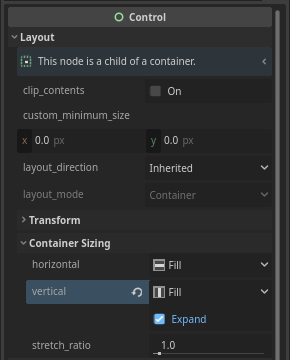
DialogueLabelandContinueIndicatornode. And lets name itSpace.MyScene ├─ TheatreStage └─ PanelContainer └─ VBoxContainer ├─ Label ├─ DialogueLabel ├─ Space └─ ContinueIndicatorSet its vertical container sizing to
Fill, and tick theExpandcheckbox.This will 'push down' the press-to-continue label, so that it 'sticks' to the bottom of the container.
Code Summary
MyScene
├─ TheatreStage
└─ PanelContainer
└─ VBoxContainer
├─ Label
├─ DialogueLabel
├─ Space
└─ ContinueIndicator
extends Control
var dlg: Dialogue # Load/create Dialogue here
@export var my_stage: TheatreStage
@export var continue_indicator: Label
func _input(event):
if event.is_action_pressed("ui_accept"):
my_stage.progress()
func _ready():
my_stage.start(dlg)
func _on_dialogue_label_text_rendered():
    continue_indicator.show()
func _on_theatre_stage_progressed():
    continue_indicator.hide()
Got any questions? feel free to ask them in the GitHub Discussions!