Toggling Dialogue UI
Dia:
    "Having the Dialogue UI visible at all time
    is probably not very ideal."
:
    "Unless you're making a full on text adventure game,
    you'd want to show the dialogue UI only when it needed to."
:
    "Here, we'll demonstrate how you can do that, with just a simple
    `show` and `hide` CanvasItem methods."
TL;DR
Utilize  TheatreStage
started, finished, and cancelled to call hide()/show() methods on the dialogue UI.
Before we begin, let's add a 'start dialogue' button, so we don't have to restart the scene everytime the dialogue ended.
-
Add a
 Button
StartButton. Adjust its text, size, and position to your liking. -
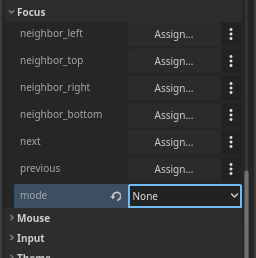
Set the
focus_modeproperty tonone. To avoid accidental button press when progressing the dialogue. -
Connect the
pressedsignal of the button to a method. In that method, call thestart()method. It should looks something like this:Now, let's move on to the tutorial.
-
Let's take a look at the current scene tree. Since
 PanelContainer
dialogue_container.Note
Don't forget to assign the node in the inspector when using
@exportannotation to reference the nodes! -
Create 2 methods:
hide_dialogue_ui()andshow_dialogue_ui(). -
For now, let's just simply show and hide the dialogue UI, by calling
hide()andshow()ondialogue_container.func show_dialogue_ui(): dialogue_container.show() func hide_dialogue_ui(): dialogue_container.hide() -
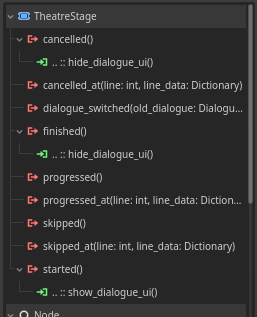
Click your
started,finished, andcancelledto the 2 methods created previously. More specifically:Signals Method startedshow_dialogue_ui()finished,cancelledhide_dialogue_ui()
Code summary
MyScene
├─ TheatreStage
├─ PanelContainer
│ └─ VBoxContainer
│ ├─ Label
│ └─ DialogueLabel
└─ StartButton
extends Control
var dlg: Dialogue # Load/create Dialogue here
@export var my_stage: TheatreStage
@export var dialogue_container: PanelContainer
func _input(event):
if event.is_action_pressed("ui_accept"):
stage.progress()
func _ready():
stage.start(dlg)
func _on_start_button_pressed():
    stage.start(dlg)
func show_dialogue_ui():
    dialogue_container.show()

func hide_dialogue_ui():
    dialogue_container.hide()
Got any questions? feel free to ask them in the GitHub Discussions!