Dialogue Beep SFX
Dia:
    "Dialogue voice beep are substitute
    for voice acting in video games."
:
    "Especially in the older titles
    and smaller budget productions."
:
    "Although not really used in modern, big budget titles anymore,
    there's many indie games that still use this today."
TL;DR
Play the dialogue beep audio with the  DialogueLabel
character_drawn signal.
-
Add the dialogue voice beep audio file to your project. In this article, we'll use one of the sound effect from Text/Dialogue Bleeps Pack by dmochas .
-
Add
 AudioStreamPlayer
beep_playervariable in the script. -
-
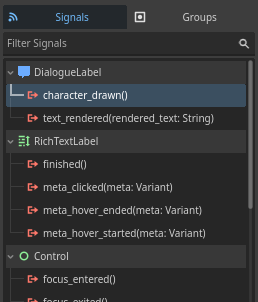
Connect the signal
character_drawnfrom_on_dialogue_label_character_drawn(). -
On the signal method, play the audio from the
beep_playerusingplay(). Only if its not already playing.
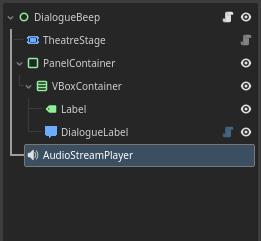

Code summary
MyScene
├─ TheatreStage
├─ PanelContainer
│ └─ VBoxContainer
│ ├─ Label
│ └─ DialogueLabel
└─ AudioStreamPlayer
extends Control
var dlg: Dialogue # Load/create Dialogue here
@export var my_stage: TheatreStage
@export var beep_player: AudioStreamPlayer
func _input(event):
if event.is_action_pressed("ui_accept"):
stage.progress()
func _ready():
stage.start(dlg)
func _on_dialogue_label_character_drawn():
    if not beep_player.playing:
        beep_player.play()
Got any questions? feel free to ask them in the GitHub Discussions!